Friday, 12 December 2014

Memrise - how to create your own "mem"

In Memrise's own words:

What is Memrise?

Memrise is an online learning community where one can learn almost anything in the world, entirely for free! Through just the right mix of science, fun and community, learning on Memrise is speedy, enjoyable and lasts.
Most people I know who have used Memrise love it. It's available both on the web and on mobile devices. The mobile app is still undergoing improvements as I write. I know because I'm helping them test their betas. ;) My recommendation is to use both.

Every so often, I create my own reading/listening activity based on current news and I usually include a lexical exercise. But, as we all know, retaining vocabulary is extremely difficult and most students forget the words they learn almost immediately after.

Since I had some time on my hands, I decided to create a course on Memrise based on these said activities. One of the strongest features of Memrise is their mems (basically, mnemonics) and although I've created a mem or two for each lexical item, my mems very often are just sentences showing how the word was used in the article of the activity.

I encourage students to make their own mems as, really, that's a good way of helping them remember the words, but it seems that many don't understand how it can be done. So, here's a short pictorial tutorial. ;)

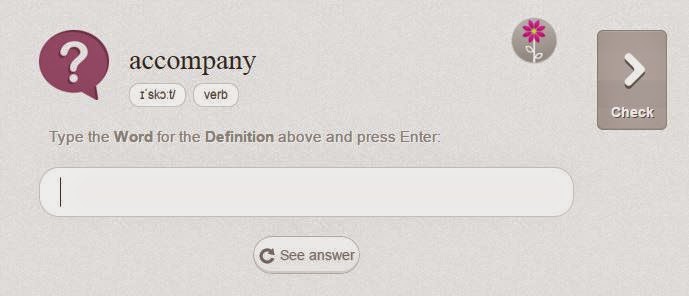
Say, you've gone into my course. You'll see something like this.

How to create a mem on Memrise

You may choose to review what you remember by clicking on Review, which will bring you to this screen.

How to create a mem on Memrise

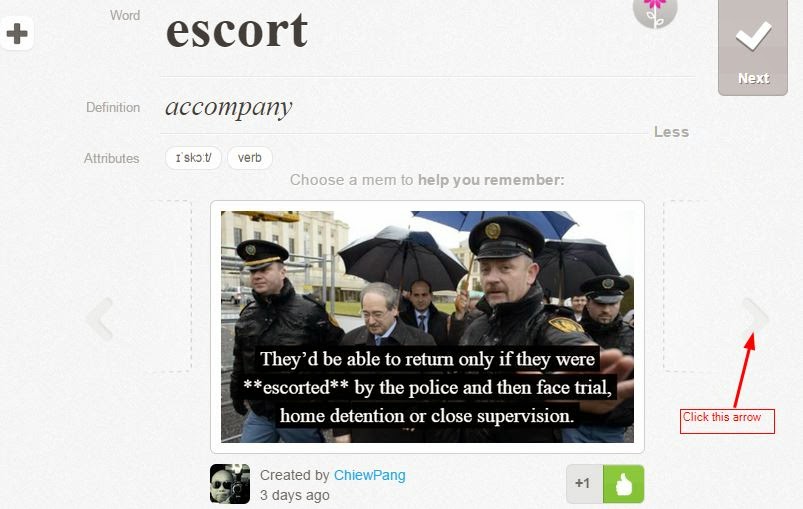
Clicking on See answer will bring you to this one.

How to create a mem on Memrise

Now, click on Choose Another Mem.

How to create a mem on Memrise

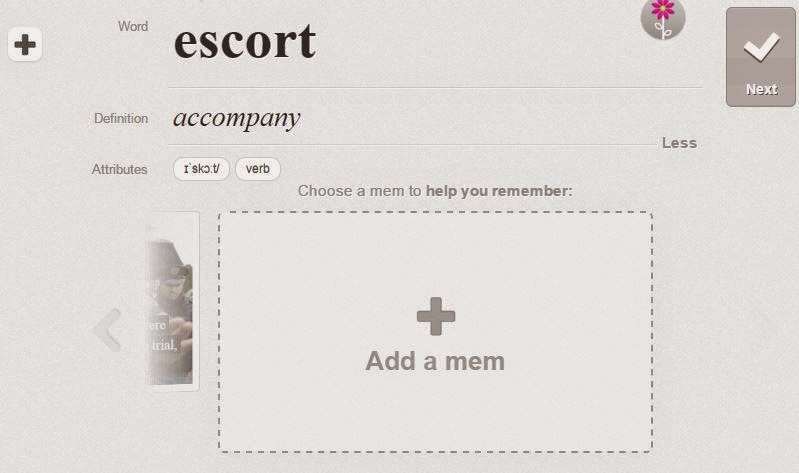
You'll see arrows to the side of the mem. Click the right-facing arrow and you'll see the next one. When there aren't any more, you'll see the following image. I know, at the moment, creating a mem isn't as straightforward as it should be. Hopefully, that will change in the near future.

How to create a mem on Memrise

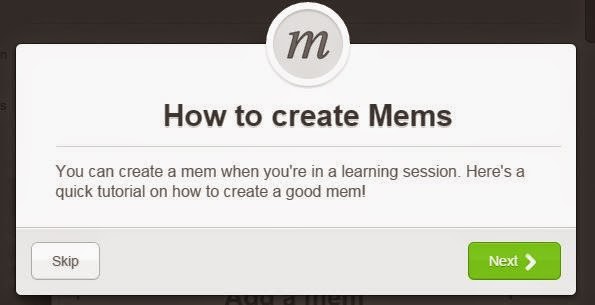
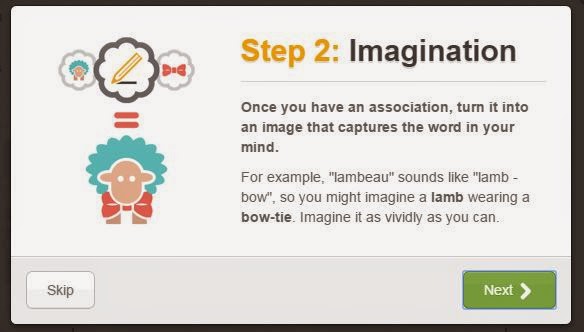
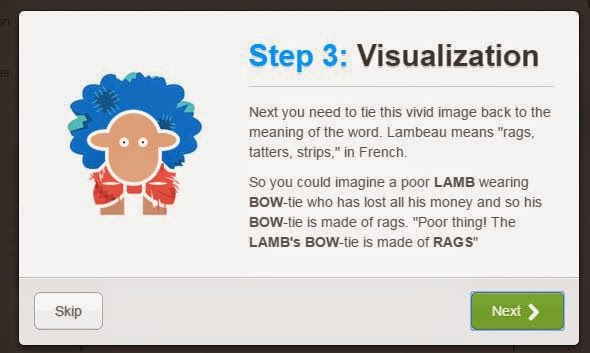
Before clicking on Add a mem, have a look at Memrise's tutorial on creating good mems.

How to create a mem on Memrise

How to create a mem on Memrise

How to create a mem on Memrise

How to create a mem on Memrise

How to create a mem on Memrise

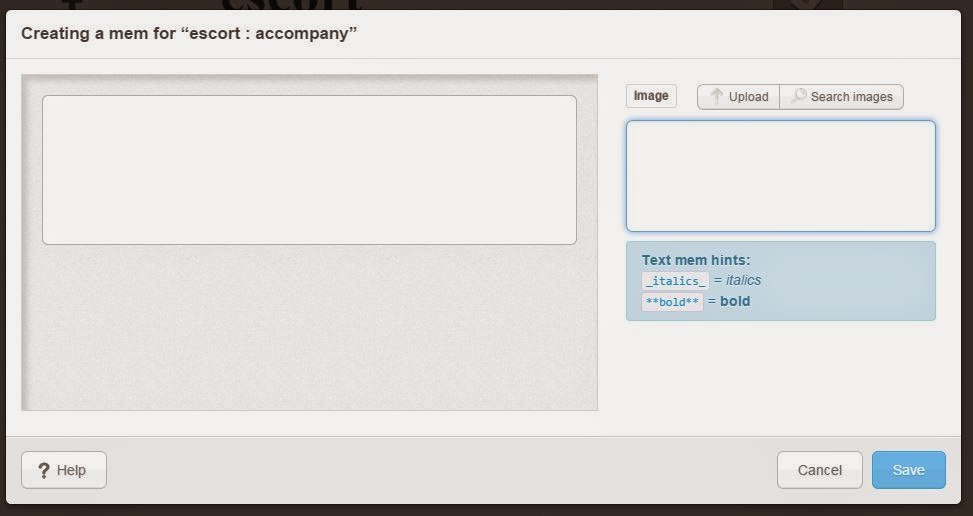
When you click on add a mem, this is what you'll see.

How to create a mem on Memrise

Write any key words you like in the search box and click on search images. When you find one you like, click on it and then save. If you don't want to use any image or you wish to upload your own, skip the search, which will bring you to this:

How to create a mem on Memrise

Type in your text. The bold and italic option only works without images. Don't ask me why.

How to create a mem on Memrise

Click save and you're done. You can modify your mem at a later stage if you like.

I look forward to seeing your mems! Feel free to voice any doubts you may have.


Sunday, 1 June 2014

The World Cup - all the words you need to know

Shunsuke Nakamura taking a free kick
Image by Neier reproduced under the Creative Commons Attribution-Share Alike 3.0 Unported license

"The most direct and enduring way to reach the mind and imagination of the learner is through the mind, imagination and character of the outstanding teacher." Lowell Milken

Well, I don't know if Fabio Capello is an outstanding teacher or not (because I don't agree with his concept of football), but back in 2011, he claimed to be able to reach the mind and imagination of his English players with a mere 100 words.

Cambridge Dictionaries didn't waste any time in reacting and came up with the 100 words here.

However, if you fancy yourself as a top manager, you may want to disagree with Capello, and reach out for the full Cambridge Corpus list of 935 football words.

Meanwhile, contend yourself with looking for the 100 words in this wordsearch. Note that attack appears 3 times! As a noun, as a verb, and it its gerund form: attacking. :D 

And, enjoy the World Cup!

Oh, the way to play it is to click on the first letter of the word, drag it to the last word. However, I think there may be a problem - I used the hyphen in some words and I think it got confused with it. Oh, well, nothing's perfect! Have fun anyway!

Make Your Own Word Search

Friday, 25 April 2014

Don't be outfoxed. Foxit!

Several months ago I was ranting about a problem with my browser; it had frequent problems and I suspected that it had something to do with Adobe software incompatibility issues. PLN to the rescue, and Cherry Matthew mentioned that he'd stopped using Adobe Reader some while ago and had opted for something called Foxit instead. 

And there I was thinking that Acrobat was the only free pdf reader available! Silly me. After the usual barrage of Q&As, I decided to put it to the test. I might have tested a few others, but I honestly can't remember. Whatever the case, it was Foxit Reader which remains on the computer.

Originally, all I wanted was to have a PDF reader which wouldn't clash with my browser, and which was light and fast. But if you use pdfs as much as I do, then you may lament the difficulty of scrolling up and down pages, you may miss sticking Post-its or scribbling notes like you could do in books, and suffer the tediousness in keeping track of documents if you're in the habit of having several open at the same time, etc.

I, therefore, didn't take long to try out some of the tempting buttons on the toolbar and once I started using them, there's no turning back. I'll outline just some of them here. Incidentally, Foxit is also available on mobile devices. And, in case you're wondering, you don't need to have Foxit to be able to see the annotations; in other words, they can be seen by other readers.

Snapshot of some Foxit capabilities


Typewriter


Type directly onto the document. Great for writing answers on exercises.


Note


Pin a note. Unlike Post-its, these aren't likely to disappear! This and the typewriter function are probably the ones I use most. The great advantage is that it can be moved out of the document, so you can have notes on both sides of the screen, away from the original words/images. What you can't do is to edit individual words within the note; for example, if you wish to highlight some words or use a different font, you can't.

I've requested this function so I'm hoping Foxit can and will allow it. Another function I've requested is to be able to write phonetic scripts, something which isn't supported right now.


Highlight


For those of you who are fond of using markers, fret not! This one's especially for you. There are two places you can do this from - in the comment menu, it's on the left, and in the home menu it's towards the centre. You can also change the colour & opacity by right-clicking on your highlighted area, then choose properties.


Drawing


You can draw circles, squares, rectangle, polygon, you can draw lines or arrows, multiple lines or freeform.


Textboxes and Callouts


These have to be within the document but have the added advantage of giving you the ability to edit individual words within the box (see Note section above).


Pin an image


You may wish to include an image on the document. You can do this by using the Image Annotation on the right of the toolbar. To see the original size, however, you'll have to click on the Image Annotation button, right click on the image, choose properties. Go to Settings.


Bookmarks


Adding a bookmark is easy. You can use the functions on the navigation panel on the left, on the top toolbar in home menu, or Ctrl B. However, I find moving the bookmarks up or down somewhat problematic as Foxit has the habit of nesting the bookmark within where you drop it off. The way I get around this problem is to move it all the way to the top and then move it down again to where I want it.

There isn't a sort function either. To avoid these problems, remember that Foxit adds the new bookmark after the one you last clicked on. In other words, before you add a bookmark, click on the bookmark after which you want to add the new one.

Nested bookmarks on Foxit


Navigating the document


I used to find navigating on PDFs a messy chore on Acrobat. Foxit's hand function is wonderful - works like a touch screen - so much so that I often try to use it on Google Docs and feel disappointed when I realise that the capability doesn't exist there!

Alternatively, you can just use the standard page up/down or the arrow up/down for more minuscule movements.

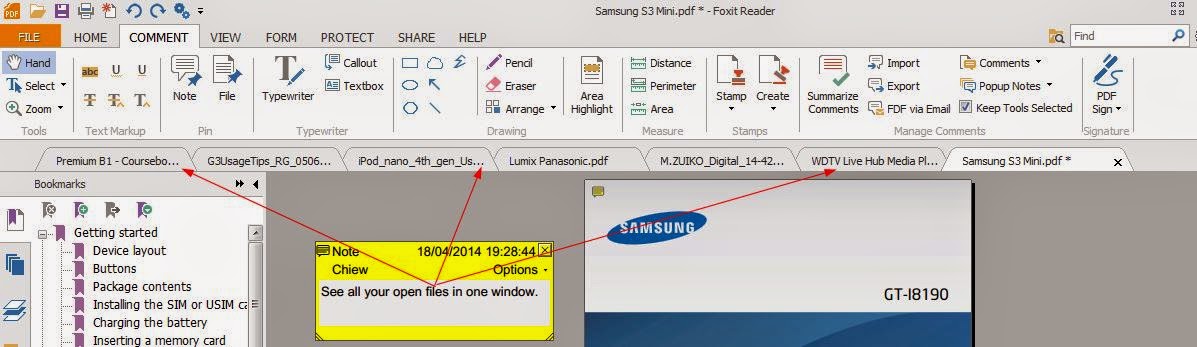
Furthermore, Foxit allows tabbed browsing, so jumping from one document to another is a breeze; just remember to save your modifications although you will be reminded if you have made any unsaved changes.

Tabbed browsing on Foxit Reader


Printing/Sharing


Of course, you may not want to share all the annotations you've made on the document. You may want to share a document and your notes with a colleague or you may want to print some pages (without your comments) for your students. You have 3 options of printing: document, document & annotations and annotations only. Having a toggle function where you can make the annotations disappear would be great if you want to beam up, say, some exercises, and then toggle on the answers. I've also requested this feature.


Other functions


There are loads of other buttons you can play with. You can link to websites, insert video, copy texts and images, etc. Copying doesn't always work because of the nature of the pdf format. Having said that, it's certainly easier to copy on Foxit than Adobe! You can either select text or do a snapshot. If I managed to copy texts, what I usually do is to paste them onto Notepad and rectify any discrepancies.

Manual

For the official manual, click here.


Feedback


So, what do you think? Are you using Foxit already? If you are, what do you most like/dislike about it? If you aren't, what do you find most attractive about it?


Sunday, 13 April 2014

RSCON5: Maxis and Minis


Be Inspired in MiniCon May

This year, the free Reform Symposium Conference will be held over the weekend of 11th to 13th July. The interesting addition is that prior to the marathon event, there are 2 mini half-day conferences, one of which was held on 6th April. Unfortunately, that coincided with the IATEFL in Harrogate but recordings are available here. If you'd missed that, you might want to get involved with the next one, to be held on Sun 6th May. Take a look here to see the exact time in your city.
What’s happening in this MiniCon?
For starters, we have teacher-poet Chaouki M'kaddem to open the event for us.
Chaouki will hand the mic over to super tech guru Steve Wheeler, more famously, perhaps, known as @timbuckteeth. Needless to say, we’re over the moon to have Steve as our keynote.
Following this, we’ll have 7 inspirers who will give a 3-5 minute sneak peek at their forthcoming presentations in RSCON5. We had 8 in April’s MiniCon and we ran a little over time, so we’re reducing it to the magical number of seven. These speakers have yet to be decided. If you’d like to be one of them, go here.
To wind up the half-day event, and leave you wanting more ;) tech smackdown comes on. Here, in just 2 minutes (per person), enthusiasts introduce us to their favourite app or web tool and tell us what’s so good about it. If you’re passionate about a tool, why don’t you tell the world? Fill in the form here.
For all other information, please visit Future of Education.
See you there!

Saturday, 26 October 2013

RSCON never sleeps...

For most people RSCON has come and gone. The weekend of 11-13th October 2013 might have been a mind-opener for some, a disappointment for others, but there can be no denying that it was a special event. It was completely online, completely free, and completely run by a group of dedicated unpaid volunteers. Unpaid in kind, but paid  in the knowledge that someone somewhere in the world would have been inspired enough to start the reform ball rolling in their community, their network.

I'd played a small part in helping the team in RSCON3, but as circumstances would have it, I found myself involved in a far greater scale than the previous event. Even while RSCON4 was still going on, we were already discussing the improvements we would like to see for the next event. Those who have continued to follow us in the social network would have noticed some of the groundwork being laid for RSCON5.

Here are some of the things that have been going on:

RSCON on Flipboard

RSCON4 on Flipboard


We have created a magazine on Flipboard to display posts that RSCONers have written regarding their experience of RSCON4.

If you wish to be included, fill in the form here: I want to be included!


When's the next RSCON?

The Reform Symposium has always been for the people, so we want to make that even truer by inviting everyone to have a say as to when they would like to have the next conference. Each day, it gets more complicated as more and more organizations (especially the professional ones with a significant budget as opposed to volunteer organizations such as ours with zero budget) jump into the bandwagon with the result that on any one day, you are bound to find a free webinar of one form or another.

Since a party is useless if no-one comes, we want the biggest audience possible, and we want to know which month gets the majority of votes. Have your say here: I want to vote!

I want to help!


We have started collecting names of people who wish to be part of the Reform Symposium community. Experience is not necessary; passion is! That's our motto. There are many ways in which you can be of help: design, promotion, presenting, moderating, training, etc. So, if you can spare some time to help others help themselves, fill in this form: I want to help!

RSCON on Facebook


RSCON on Facebook


Since we want to reach the maximum number of people possible and even the most non-techie person is using Facebook, we decided that it is the best platform for us to use to keep our followers up to date. So, if you want the latest juiciest information, be sure to "like" us!

In addition, we have also created an RSCON group as groups seem to be more user-friendly than pages! Join us:

I would like to propose a presenter

Now you can! Just fill in this form: propose a presenter. Remember passion is more important to experience for us!


Thanks for sharing our passion!


Saturday, 28 September 2013

#RSCON4 Reform Symposium 11-13 Oct 2013: Useful links

I won't say much as I'm sure you must have read plenty about RSCON, the Reform Symposium. Instead, I'll place some useful links here because I know how, sometimes, it's difficult to find what you're looking for. If you are still in doubt regarding any aspect of this incredible e-conference, just get in touch with me.


Twitter Lists

Apart from following the hashtag #RSCON4, you may like to follow the people who are making it all possible. Subscribing to the lists is best because names may be added from time to time.


Spread the Word

Write about it in your blog. Wear a badge. Tweet it. Tell everyone in the social media scene.


If you've written a blog post, have it included here: http://goo.gl/KvplSP

If you're a presenter or an EdInspire nominee, you should have got a personal message about where to get the badge. Otherwise, get in touch with me.

If you know someone who deserves to be nominated for the EdInspire award, here's the form.

Main website: 


Prezi (courtesy of Chris Smith @shamblesguru): 


Pinterest:


Volunteers

Join up as a volunteer. Help us moderate. To make sure everything runs as smoothly as possible, we need more MODERATORS from all the time zones! Go here for more details: http://www.futureofeducation.com/page/call-for-rscon4-volunteer-moderators

Remember that even though you're a presenter, you can still moderate the other sessions!

Practice:

You can practise by signing up for a free WeCollaborate room: http://try.bbcollaborate.com/trial/register.go

Training sessions

The 2 official training sessions are over, but you can watch the recordings.

There are two - they are similar. The links are given at the end of this post.

When you click on either link, you'll be asked to save a file called nativeplayback.jnlp
Save it where you can find it easily, on your desktop, for example.
When it's finished saving, open it.
This will start the recording. It may take a few minutes to load.
Click on play to begin the playback.

The whole recording lasts for 76 minutes although you can fast forward or rewind it.

http://goo.gl/TSgd3I
http://goo.gl/fTv8zM

If you're still unsure about participating in webinars and need extra training, feel free to contact me for a private session.

Bookmark this page. If there's anything else that I think may be useful, I'll come back here and edit.

I look forward to meeting you all in a week's time!

Schedule


Scroll down and click on your time zone.

Saturday, 29 June 2013

Punctuation..? A review

A review of Thomas Bohm's Punctuation..?

Definition 


Macmillan defines it as “the use of marks such as full stops or commas in order to write in a clear style”.

Oxford's definition is slightly wordier:  “the marks, such as full stop, comma, and brackets, used in writing to separate sentences and their elements and to clarify meaning”.

Edgar Allan Poe, the 19th century American poet and writer has been quoted as saying “The writer who neglects punctuation, or mispunctuates, is liable to be misunderstood.... For the want of merely a comma, it often occurs that an axiom appears a paradox, or that a sarcasm is converted into a sermonoid.” (Source: Dictionary.com)

Yet, punctuation has caused endless debates over the years, and one of the main culprits is the apostrophe.

Apostrophe 


Serious “apostrophers” walk around with a marker, correcting signs and notices; websites and organisations, such as TheApostrophe Protection Society and Kill the apostrophe have been created; and in 2009, Birmingham City Council removed apostrophes from all its signs! (Source: TheTelegraph)

Do you know that there is even an International Apostrophe Day (18th Aug)?

So, when I was asked to review a little book on punctuation, it didn't take much to convince me.

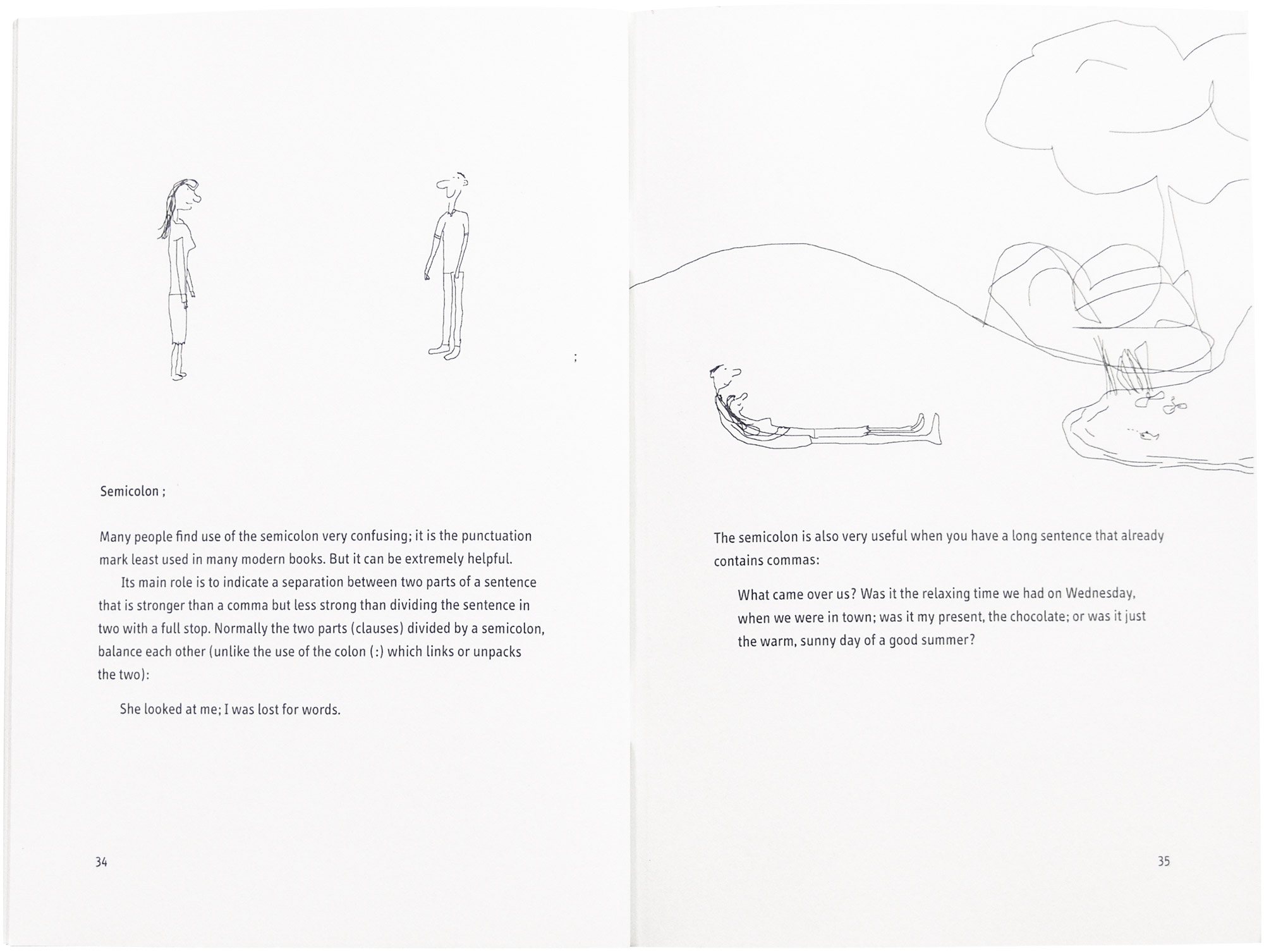
Simply titled, “Punctuation..?”, it is written by Thomas Bohm, who also did the childlike illustrations, adding a touch of wit to the otherwise dryish but clear explanations. The book is available in Central Books, Waterstones and Amazon.

“Punctuation..?” seeks to explain the functions and correct uses of 21 of the most used punctuation marks in alphabetical order, starting from the controversial apostrophe and ends with one of the most confusing for a lot of people – the semicolon.

Why does the apostrophe cause so much distress? Bohm says that the most common use of an apostrophe is to indicate possession although he didn't cite his source for such a conclusion. He's probably right but I can't help but think that it might be a close call with its use to show omission, eg can't, doesn't, etc.

What is more important, however, is Bohm's failure to mention what happens when the name of the person ends with an s, such as Dickens or Frances, or when talking about a singular noun which ends in s, eg class.
On the other hand, it is interesting that Bohm should mention “the apostrophe has largely vanished from company names”. Waterstones, for example, removed their apostrophe as recent as 2012!

Brackets 


Bohm mentions the round, curly and square brackets. Apparently, there are rules attached to them. Most of us, me included, use only the round brackets, but I sometimes use a different one if I need brackets within brackets and I also use the square brackets to denote if a verb is transitive or intransitive, or if a noun is countable or uncountable, as in the dictionaries. The curly brackets are supposedly for showing “a series of equal choices” whatever that means and square brackets are for showing a different tone or to clarify information.

The rest... 


Aside from the use of brackets, Bohm insists that the dash, the em dash and hyphen are all different. There is also something called interpunct, which is a small dot vertically centred between words. I don't know where to find this on my keyboard.

Bohm also states that the double quotation marks are reserved for quotes within quotes and the single are now mainly used.

I'm not too sure about this because I still see double quotes everywhere.

Conclusion 


As you notice, there are bits of interesting information scattered about in this booklet; some, you may know while others may come as a surprise. Rules about the usage of punctuation are readily available on the Net, but if you are one of those who prefer a hard copy at hand, I can heartily recommend this book. It's handy and small (35 pages) and does well what it sets out to do. I can't help but think, however, that an e-book version would serve as a better vehicle.


Thursday, 18 April 2013

How do you teach English?

Kaplan surveyed more than 500 ESL teachers from around the world to discover what tools they use to enhance their lessons. Here's an infographic they created to show the results.

Which do you use?


elt efl ell esl clil How to teach English

Saturday, 13 April 2013

Confusing words: Whether or if?

"Police are probing WHETHER the deaths of a woman, 107, and her daughter are a murder and suicide." (The Mirror, 12 Apr 2013)

" 'I didn't know WHETHER to laugh or cry'- Twitter responds to Lindsay Lohan on Charlie Sheen's Anger Management." (The Independent, 12 Apr 2013)

Image by Chiew Pang. Copyright 2012
I don't know whether or not I should...
 
There are often doubts regarding the use of "whether", especially among learners up to B1 level.

WHETHER /ˈwɛðə/ is a conjunction used when we're expressing a doubt or choice between alternatives.

In indirect questions which expect a yes/no answer, we can either use whether or if.

I asked them whether/if they were going to take the exams in June.


If or appears later in the sentence, we generally prefer whether, although if is also possible.

They weren't sure whether/if she was telling the truth or not.  

Whether and not if is used in the following conditions:

Before an infinitive 

They can't decide whether to take the exams in June.

After a preposition

The students were unsure about whether the teacher's explanation was helpful. 

Immediately before "or not"

I'm not sure whether or not the students are ready.  

Contrast with: I'm not sure whether/if the students are ready or not. 

Spelling 

Don't confuse the spelling of the conjunction whether with the noun weather. 

Both are pronounced the same: /ˈwɛðə/


Sunday, 10 March 2013

Friday, 2 November 2012

Breaking rules with John Fanselow


iTDi is a community of international teachers who work together to help other teachers from all around the world. Membership is free, and they offer regular free webinars (online conference), forum and courses.
Next week they have a special course, as you can see from the above poster, imparted by John F Fanselow, quite a character, I can tell you! If I were you, I wouldn't miss it. You can read the details on the poster, so there isn't any need for me to repeat it. The direct link for the course is: http://itdi.pro/itdihome/breakRules.php

Now, the good news. If you register through the iTDi site, the cost is US$99, approximately 80€. If you're based in Spain, I have a special offer for you (we all know about the crisis!). You'll have to register through me though. Payment can be made via Paypal or bank transfer. Paypal is easier and quicker. Paypal charges no fee to transfer money. If you don’t have a Paypal account yet, you can set one up free at https://www.paypal.com. However, you don’t need to have a Paypal account to send money via Paypal. All you need is an international credit card.

Do hurry as I can only keep this offer open until 9th November! Spread the news to your fellow teachers! Email me at acliltoclimb@gmail.com for further enquiries.

Tuesday, 4 September 2012

Voice #237 on an edventure

Once in a while someone catches me off-guard and this is one of those times. Anthony Salcito, Vice President of Worldwide Education at Microsoft, runs a personal blog, www.dailyedventures.com, where he speaks to "heroes in education worldwide".

Each day the blog features an interview with someone in the education sector: "teachers, school leaders, policy-makers, business leaders, celebrities, NGO leaders, researchers - people who have embraced enhancing education as a core facet in their lives." Anthony tries to find out who these people are, what inspires them, what frustrates them, and what hopes they hold for the future of education.

So, when I was contacted to participate, how can I possibly refuse, right?
You can read about the interview here.


Saturday, 11 August 2012

Re-blog: #ELTchat: the loss of eltchat.com – Plan B


This post was originally posted by Marisa Constantinides on TEFL Matters. I may not be a frequent attendee in the regular #ELTChat on Twitter, but I do pop in from time to time and I greatly admire and respect the organisers, moderators and the participants. It is a blow what has happened with eltchat.com but it isn't the end of the world. If anything, eltchat.org will grow and dwarf its predecessor, of that I'm sure.

For the last – well, almost two years now, since September 15 2010, #ELTchat has kept us on our toes and forged hundreds of professional and personal relationships amongst its followers who turn up on Twitter every Wednesday to talk about topics they have suggested and voted on – a community of peers which was created by a small group of colleagues – which grew and grew some more and became something that counts as an important part of our continuous professional development.
Like many great ideas, it didn’t hit just one person but several.
And that is how #ELTchat was created.    ELTChat for educators in English Language Teaching
The website to keep up the communication of its members, a base and repository of our ideas was one of the first things we all thought of creating – the wiki came later.

Andy Chaplin was keen to join the moderation team and help with podcasts and technical stuff; he was quick to buy eltchat.com and announced the good news to us after the fact.
A few months later, right after TESOL France 2011,  he suddenly disappeared – some say for reasons of health.
We never found out for sure.

We never received a single word of response to our emails.
eltchat.com was and still is registered in his name.

And yesterday we lost it


On August 8 the domain expired and we have no way of taking over unless it goes up for sale again; it was very sad that Andy Chaplin did not find it appropriate to renew.
The news is really upsetting.
The work we have put in on this website cannot be told in a few simple words – but it has been a labour of love and we have got so much out of it that we have never regretted one single moment
We are pretty upset at the behaviour of this individual – disappointment is one big understatement.
But we trust that our community of #ELTchatters, our PLN for short, will again gather round the new domain which we have purchased – eltchat.org

It will take us a few days to put the website back on its feet
And all will be as it was before – all the posts in place all your thoughts and comments, all the polls and great summaries which got us on the shortlist of the ELTon Awards nominations
We will be back with a vengeance
We are not just a website – we did not get on the ELTon awards shortlist as just another website!!!

We are a great community of teachers and we have a Plan B!


See you all in September!!!
Marisa Constantinides – Shaun Wilden
Chiew Pang


P.S. We would greatly appreciate it if any of you belonging to this great community of teachers,  teacher educators, bloggers, #ELTchat followers,  reposted this on your blog
If you decide to do this, please add your name to the post under ours.

Wednesday, 18 July 2012

Coconut carrot cake recipe, mmm... scrumptious!

Coconut carrot cake recipe on A CLIL TO CLIMB

I had some almonds and hazelnuts leftover from the chocolate cake I made almost a month and a half ago so I'd been thinking of baking another since then. Those of you who are following this blog and my Twitter account would probably have heard of (and seen) my healthy carrot cake recipe, so I thought I'd try to vary it a little and make it somewhat naughtier!

So, here goes.

Ingredients:

200g corn oil (you can use any vegetable oil or if you can handle the cholesterol, butter)
200g brown sugar (you can reduce this a little if you wish, to about 150-175g)
1 teaspoon vanilla essence
4 small eggs (approximately 55g each)
200g wholemeal flour
2 teaspoons (10g) baking powder
1/4 teaspoon salt
50g dessicated coconut

200g carrots, grated
1 tablespoon cinnamon
1 teaspoon nutmeg
1 teaspoon cloves
150g almond-hazelnut mix, grounded

Procedure:

  1. Heat the oven to 180ºC and grease a cake tin with butter or oil.
  2. Pour the corn oil into a large bowl. If using butter, melt it gently and leave to cool before pouring it in.
  3. Stir in the sugar, vanilla essence, eggs, flour, baking powder, salt and the dessicated coconut.
  4. Mix it well.
  5. Add in the grated carrots, spices and the nuts.
  6. Blend it all thoroughly.
  7. Pour the mixture into the greased cake tin.
  8. Bake on a lower rack at 180ºC for about 40 minutes.
  9. Turn off the oven and leave the cake in there for a further 10 minutes.
  10. If an inserted skewer comes out clean, it's done.
  11. Leave to cool.
  12. When cool, slide a thin spatula along the edges to loosen the cake before attempting to remove it from the mould.
This turned out really good. My son thinks it's the best carrot cake I've done!

Enjoy!
Coconut carrot cake recipe on A CLIL TO CLIMB


Sunday, 1 July 2012

Basic parts of a bicycle

It's been a long time since I created a tagging game, so it's about time I rectify that. Here's one on the basic parts of a bicycle. These are the answers. To play the game, click on the image.


  1. bell
  2. brake lever
  3. stem
  4. cable
  5. top tube
  6. brakes
  7. spoke
  8. fork
  9. valve
  10. flat tyre (puncture)
  11. front reflector
  12. down tube
  13. saddle (seat)
  14. seat post
  15. seat post clamp
  16. seat tube
  17. tyre
  18. chain
  19. crank arm
  20. pedal
  21. rear reflector
ELT CLIL EFL ESOL Bicycle parts game activity

If you need higher-resolution images, click on the following images.

ELT CLIL EFL ESOL Bicycle parts game activity
Image by C. Pang

ELT CLIL EFL ESOL Bicycle parts game activity
Image by C. Pang

Friday, 15 June 2012

A case for CPD and PLN...

ELT EFL ESL CLIL PLN CPD Resources, images, ideas
Photos by me. See more here.

Here's an example of how a seed is taken and planted with care many miles away where it soon grows into a pretty flower. This flowering stem is again taken some distance away, where it grows and grows and we now have a lush beautiful garden...

It all started with a comment I made in Scott Thornbury's post on iTDi's blog "How important is homework?" I'd first talked about it in The Dogme Diaries, but I don't suppose many people read that ;-)

I mentioned that the homework I set a class of adult teachers was basically three questions:
  • What have you learnt today?
  • What part of the lesson did you like or dislike in the class today?
  • What would you like to do in class next week?
A couple of months later, Alexandra Chistyakova wrote to say that she'd used the questions with her class of university students, and how well that had gone down. You can read about how she moulded my homework to suit her personality and that of her class here:


Then, a little while later, Barbara Bujtás read Alexandra's posts and decided to adapt it to her class of 3-year-olds! You can read about it here:


You can see the beauty of her work here:


So, if you're not involved in a PLN (personal learning network) or have not been convinced of it, I hope this little episode will serve to change your mind!

Alexandra and Barbara, you both rock!

Learn about continuing professional development here: http://www.scoop.it/t/continuing-teacher-development

Learn about the benefits of Twitter here: http://www.scoop.it/t/why-twitter-for-teachers


Saturday, 19 May 2012

Twitter hashtags for educators: an index, at last!

If you're using Twitter, chances are that you are at least aware of hashtags, even if you don't use them. And if you do use them, no doubt, you've sometimes felt somewhat overwhelmed and confused. Part of the problem is it's a free-for-all concept. There's no official body to register hashtags and everyone can use any words as hashtags, and as many as they want.

Through time, nevertheless, regular tweeps (people who tweet) tend to stick to a few they use for their own interests but still feel at a lost to what unfamiliar ones mean. Worse, for me, is the duplication of tags and the long ones, especially when abbreviation is possible. Bear in mind that each tag eats up on the 140-character limit that Twitter has!

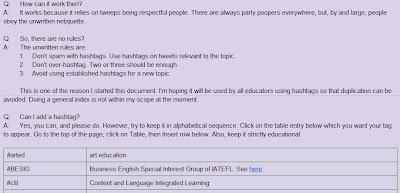
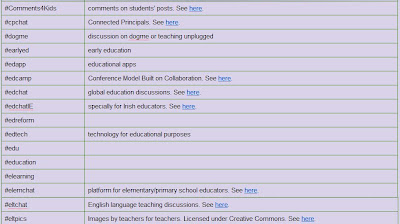
A recent confusion on a tag was the impetus I needed to create an index, unofficial as it may be. Whether it works depends on the will of others to keep it going. It's done on Google Doc, free for everyone to update. As long as it's not vandalised, I'll keep it public. My wish is that educators would start streamlining hashtags and mark unused ones as OBSOLETE or REPLACED BY... so that the community will grow even more.

What's your opinion? Will you start using it and let others know, too?

Twitter education hashtags index


Wednesday, 16 May 2012

Top 100 Language Lovers 2012 - Who are you voting for?

The Top 100 Language Lovers 2012 competition is on again! This year, there had been 935 nominations! A CLIL TO CLIMB has been included for voting in the language learning blogs category. There are four categories in all.

50% of the final score is based on user votes; the other 50% is based on Lexiophiles' judging team's criteria. If you have found this blog useful, your vote will be most appreciated!


Each person can vote once in all four categories.

  Vote the Top 100 Language Learning Blogs 2012

The voting phase started on May 15th, and ends on May 28th, 23:59 German time. Read more about the voting phase here.

The results will be published on May 31st.


Saturday, 12 May 2012

What would you do if...?

ELT ESL EFL CLIL Lesson plans images conversation dogme photos
Image by Chiew Pang
When I saw this...

At first, I just walked past. Later I thought, what if...

And I started fantasizing about the briefcase holding wads of crisp bills...

Then the language teacher ego took hold of me and said, hell, there's an awful lot of possibilities there for a conversation lesson, full of lexical challenges.

So, what would you do if you saw something like this? Ponder over it while I go back to my fantasies...

This image is part of the Project 366 series. If you're involved in it, (and if not, why don't you start?) please let us know in this Google Doc. My images are in Flickr, free for non-commercial use as long as they are properly attributed.

Sunday, 6 May 2012

How to stay healthy the cheap & easy way

Have you heard the quotation “A sound body makes for a sound mind”? Well, actually, I'm not sure if such a quote do exist, but the ancient Roman poet, Juvenal, did say

orandum est ut sit mens sana in corpore sano

which can be translated as

It is to be prayed that the mind be sound in a sound body.

The latest topic in iTDi's blog is "Staying healthy and motivated" - if you haven't seen it, I suggest you do it soon. However, most of the advice was centred on tips on how to stay motivated, so I thought I'd redress the balance ;-) and write about health here. After all, if the body isn't healthy, the mind struggles to remain sound.

Inadvertently, when one talks about health, two topics come to mind - that of exercise and diet.

This article is written with those who are more in the physically inactive rather than the active camp. So, if you're already physically on the ball, what I'm about to say may not be all new to you.

My ideas are very basic and can be started upon straightaway. No need to enrol in a sports club or gym, no need to seek an expert trainer. Just a slight change in your habits, that's all. However, I must say that these opinions are my own. If you haven't been active for a long time, I'd suggest going for a medical check-up first and make sure you're fit enough to do some physical activity.

Breathing

ELT iTDi CLIL health and motivation
Image by Chiew Pang
This is primordial, so primordial that most have forgotten how to do it! Right, you're probably thinking I've gone bonkers.

Many of us breathe too shallowly; and if I were to say, "Breathe deeply!" chances are that you'll inflate your chest to the maximum and struggle after a few seconds. Isn't that right?

Well, it is your stomach that you should be inflating, not your chest. The proper way to breathe is to use your stomach muscles, not your chest. Put your hand on your stomach and breathe - is it moving? Or does your chest move first?

Watch babies - they breathe the correct way. Naturally. In fact, there's one way to force yourself to breathe in the right manner. Lie face down and breathe. What do you notice? Your stomach moves, right? Now, stand up, and try to repeat it.

Whenever you remember, notice your breathing. Correct it. Take long deep breaths (with your stomach) instead of short gulps. Do it often until it becomes second nature. Just like to a baby.

The morning
Image by Malene Thyssen

What's your morning routine?

For as long as I can remember - and we're talking about 3 decades or so here - I follow a simple exercise routine. I must admit that the duration gets shorter and shorter as the muscles and the joints start complaining...

The morning is important as it sets your body (and the mind) up for the rest of the day. You don't have to hump and pump; just do light stretching and rotational exercises. You don't need to dedicate a lot of time either. 5 minutes is better than nothing.

Rotate all the joints: ankles, knees, hip, neck, shoulders, wrists...
Stretch gently - if you're too old to remember your PE classes ;-) try googling "stretching exercises".

Later on, when you're in better shape, you can add simple free-hand exercises such as sit-ups, squats and push-ups. Or you can do isometric exercises.

Notch it up

ELT iTDi CLIL health and motivation
Image by Chiew Pang
You've heard it, I'm sure - before jumping into your car, think "Can I walk instead?"

When you walk, just quicken your pace slightly. Feel your legs stride, your back strong, your breathing deep and regular (stomach moving!).

You've also heard this one before. Take the stairs. Do it! Start by walking down - it's often quicker than the lift anyway! Gradually, start walking up, too. If there are too many flights, do a few. Combine it with the lift.

Move on the escalators and the travelators; don't just stand still.

The premise is simple: move as much as you can, whenever you can. Your heart will be grateful to you for it.

Diet

ELT iTDi CLIL health and motivation
Image by Chiew Pang
Again, I go back to the morning. It's the most important part of the day. To break your fast, have a glass of water (at room temperature).

Then, you do your breathing and stretching exercises, and after that, you're ready for a nutritious breakfast! You need a high-energy, not a high-calorie, one. Carbohydrates, not fat; complex carbohydrate (like grains) not simple (like sugar). My breakfast usually consists of a steaming cup of tea and a bowl of muesli supplemented with a tablespoon of wheat bran, some yoghurt, a banana, some cornflakes, and soya milk.

As far as food is concerned, I'm sure you know the drill: less fat, more protein; lots of fruit and vegetables; less frying, more grilling and steaming. Go easy on the sugar, but a treat once in a while doesn't do anyone any harm! ;-)

ELT iTDi CLIL health and motivation
Image by Chiew Pang

Stay healthy! Stay motivated!